
A calm document readerfor every good read.
Open EPUB, PDF, Markdown, text and Novellier files in one quiet space. Free, fully offline, and no account required.
Free · Windows 10 or 11 · Version 1.1.1
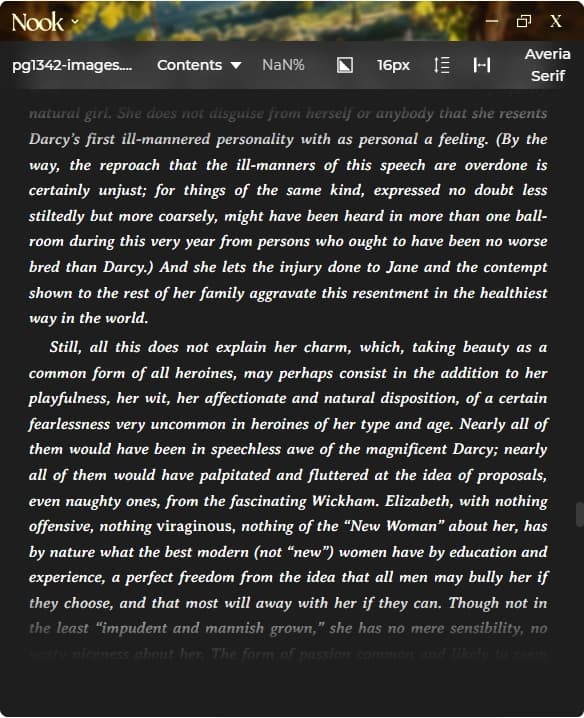
short answerNook is a free document reader for Windows and macOS. Opens EPUB, PDF, Markdown, TXT, RTF, and Novellier project files (.nvl). Customisable themes including dark mode, adjustable fonts and margins, keyboard navigation. No account required, no subscription, works offline. From Novellier.
Features
Free. No subscription, no ads, no account
Opens EPUB, PDF, Markdown, TXT, RTF, and NVL files
Multiple themes including dark, light, and sepia
Customise fonts, font size, margins, and line spacing
Auto-hiding toolbar for distraction-free reading
Full keyboard navigation and shortcuts
Works completely offline. Your files stay private
Lightweight. Under 10MB installed
Supported Formats
EPUB
Full TOC navigation and reading controls
Zoom and scroll mode controls
Markdown
Rendered with styling
TXT
Plain text with full readability controls
RTF
Rich text format
NVL
Novellier project files. Read manuscripts in chapter order
Nook vs Calibre vs Adobe Reader
How Nook compares to other document readers.
| Feature | Calibre | Adobe Reader | Nook |
|---|---|---|---|
| Price | |||
| EPUB support | |||
| PDF support | |||
| Markdown support | |||
| Dark mode | |||
| Font customisation | |||
| Margin controls | |||
| Line spacing | |||
| Modern UI | |||
| Auto-hiding toolbar | |||
| Keyboard shortcuts | |||
| Setup required | |||
| Offline support | |||
| Install size |
Your next good readstarts here.
No account. No subscription. Just reading. Choose your installer and settle into your book.
Version 1.1.1
Questions,answered.
Free, fully offline, and ready to read. Here’s what else you might want to know.
Yes. No subscriptions, no ads, no account needed. Just download and read.