
Free EPUB reading,beautifully simple.
A lightweight alternative to Calibre. Just reading, nothing else.
Free · Windows 10 or 11 · Version 1.1.1
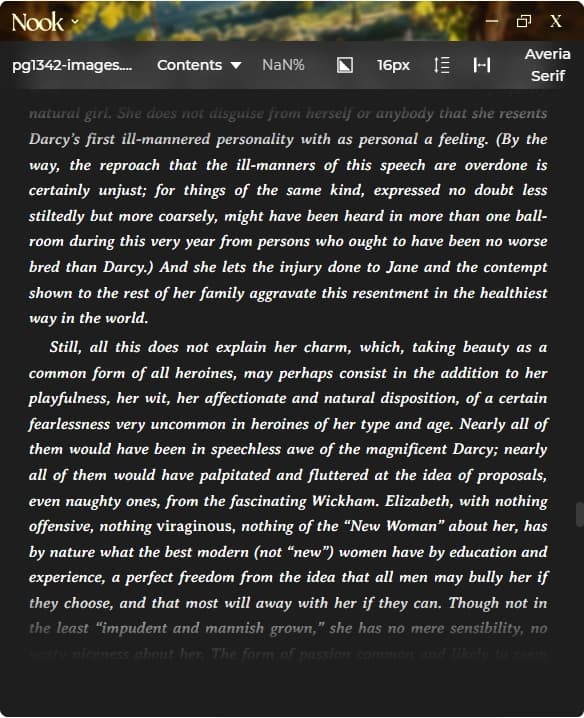
short answerNook is a free EPUB reader for Windows and macOS with customisable fonts, dark mode, and keyboard navigation. No library setup required. Open your EPUB and start reading. Free, no account needed.
Nook vs Calibre
No library setup. Just open files and read
Built-in dark mode
One-click font and margin customisation
Clean, minimal interface
Under 10MB install (Calibre is 150MB+)
Full table of contents navigation
Keyboard shortcuts for everything
Also reads PDF, Markdown, and text files
EPUB Reading Features
TOC Navigation
Full table of contents. Jump to any chapter instantly.
Reading Progress
See your position. Page numbers or percentage.
Themes
Dark, light, sepia, and more. Easy on the eyes.
Font Control
Multiple fonts. Adjust size with keyboard shortcuts.
Margins & Spacing
Narrow, normal, or wide. Compact, normal, or relaxed.
Search
Find text within your EPUB. Navigate between matches.
Your next good readstarts here.
No account. No subscription. Just reading. Choose your installer and settle into your book.
Version 1.1.1
Questions,answered.
Free, fully offline, and ready to read. Here’s what else you might want to know.
Yes. No subscription, no ads, no account. Download and start reading.